Showing posts with label technology. Show all posts
Showing posts with label technology. Show all posts
4/25/2013
The African Monkey with a Diamond - Searching for the Truth
Joe Rogan on Materialism and Technology --> a TRUTH conversation.
And the timing was impeccable... I understood what he was talking about when he spoke of the YUGA CYCLE since I just finished watching (the YUGA CYCLE is explained at about 22 minutes in):


3/11/2013
The Art of Execution: Passion to Action
Let's get down to business, and by business I mean: Gary Vaynerchuk
Youtube video of Gary Vaynerchuk via theARTof.com
Are you a hockey player playing soccer? And if so, are you the type to drop the stick and start dribbling or will step-out and go find a pond?
Wow, nothing like just getting right down to the point! Love it, thank you Gary!
Knowing WHO you are and WHAT drives you is indeed an important factor in life - that IS what life should be about; however like most of us know - it doesn't always workout that way. We live in a world where we build ourselves-up to become who we 'think' we should be and we end-up doing stuff we 'think' we should be doing... Yikes! All-this-while watching those who don't conform rise to the top!
Look at yourself in the mirror (as Gary explains), REALLY look at yourself and ... let's get honest here. If you can't be honest with yourself - and truly allow yourself "your" truth - then how do you expect it to ever become a reality.
Youtube video of Gary Vaynerchuk via theARTof.com
Are you a hockey player playing soccer? And if so, are you the type to drop the stick and start dribbling or will step-out and go find a pond?
Wow, nothing like just getting right down to the point! Love it, thank you Gary!
Knowing WHO you are and WHAT drives you is indeed an important factor in life - that IS what life should be about; however like most of us know - it doesn't always workout that way. We live in a world where we build ourselves-up to become who we 'think' we should be and we end-up doing stuff we 'think' we should be doing... Yikes! All-this-while watching those who don't conform rise to the top!
Look at yourself in the mirror (as Gary explains), REALLY look at yourself and ... let's get honest here. If you can't be honest with yourself - and truly allow yourself "your" truth - then how do you expect it to ever become a reality.
6/07/2012
Inspirational Mind Maps - What's Your Flow?
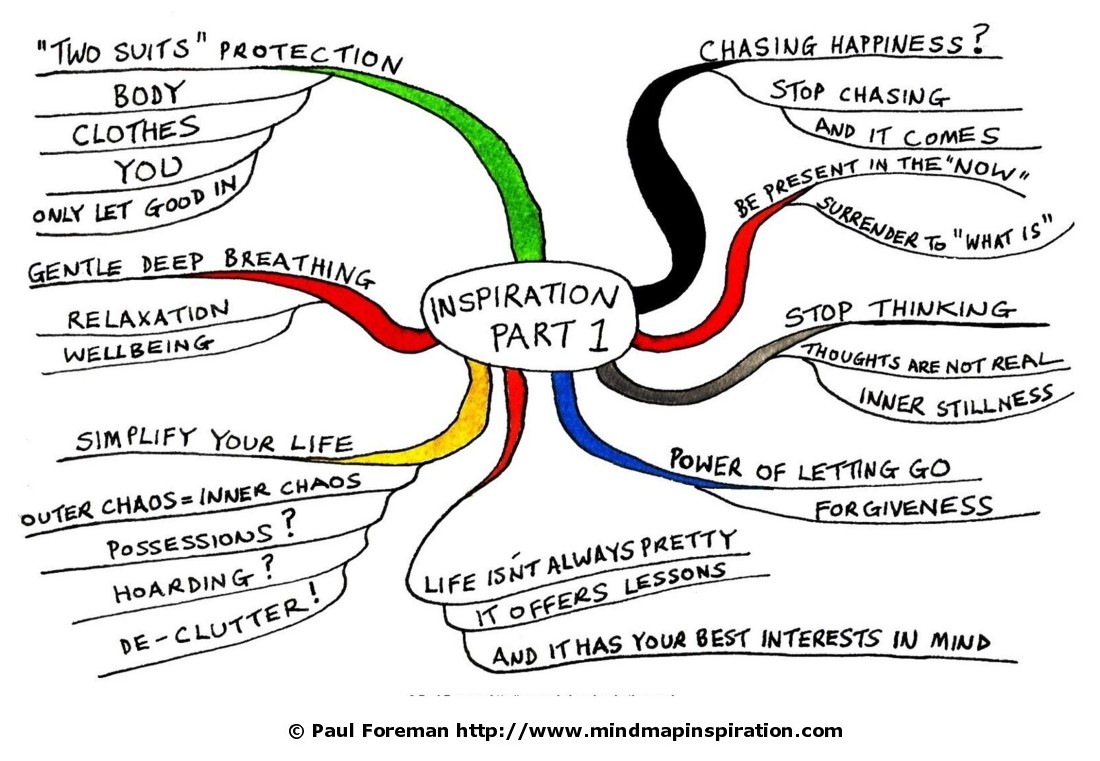
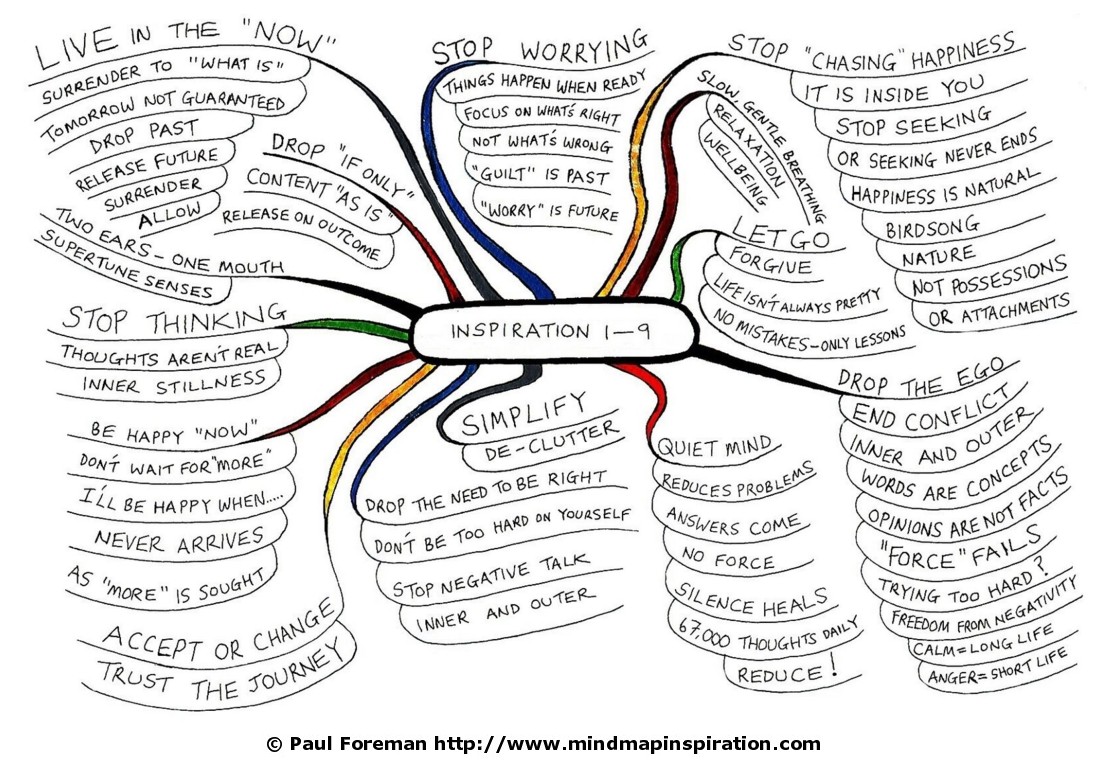
Well found this interesting inspiration and figured what better way to talk about, then to simply share it... http://www.mindmapinspiration.com/inspiration-mind-maps-1-9-by-paul-foreman/
The author, Paul Foreman, also offers The Inspiration Mind Maps 1-9 as a Free E-Book:
http://www.mindmapinspiration.co.uk/#/mind-map-e-books/4529839181
I'm a visual person and absolutely love Flows - especially Flow Charts!!
Being an Information Technologist, this is right up my alley! ;-)
Thank you Paul for allowing us a glimpse into your world, or should I say into your mind-map!
What's your "inspiration mind map"?
Layout your thought patterns into a chart, and slowly keep deciphering it deeper, and deeper...
Till you've created your-own mind-map.
I think this is so simple, it's brilliant!
Guess what I'm gonna be doing... lol
Below are pictures (linked directly from http://www.mindmapinspiration.com)
There are 9-levels of mind-maps for inspiration, please visit their site to view all 9-levels.
I'm just sharing with you a short summary (again visit http://www.mindmapinspiration.com for full description, it's worth it)!
Here's a description of Level 1:
 ...and then the process moves from level to level, till it reaches level-9:

The author, Paul Foreman, also offers The Inspiration Mind Maps 1-9 as a Free E-Book:
http://www.mindmapinspiration.co.uk/#/mind-map-e-books/4529839181
I'm a visual person and absolutely love Flows - especially Flow Charts!!
Being an Information Technologist, this is right up my alley! ;-)
Thank you Paul for allowing us a glimpse into your world, or should I say into your mind-map!
What's your "inspiration mind map"?
Layout your thought patterns into a chart, and slowly keep deciphering it deeper, and deeper...
Till you've created your-own mind-map.
I think this is so simple, it's brilliant!
Guess what I'm gonna be doing... lol
Below are pictures (linked directly from http://www.mindmapinspiration.com)
There are 9-levels of mind-maps for inspiration, please visit their site to view all 9-levels.
I'm just sharing with you a short summary (again visit http://www.mindmapinspiration.com for full description, it's worth it)!
Here's a description of Level 1:
4/27/2011

4/25/2011
Myers-Briggs - What's Your Type?
Most people, at some point or another, reach a point where they're unsure as to what line-of-work / career path they should pursue. Now-a-days there are various tests, quizzes, heck probably blood-type indicators that will help direct you in some manner... either way choosing a line-of-work / career path isn't something you need to set in stone. Like most other activities (example: sports; fitness program; hobby classes; etc...) it's a "try it out and see if you like it" dabble - although with some career path requiring education first-hand, some of these 'dabbles' might be a little-costly if it turns out that this isn't something you 'see yourself doing' for an extended period of time... hence why a majority of individuals choose to attempt some form of 'testing' to see if their instincts are in-sync with some of the testing results.
And this is where the Myers-Briggs Type Indicator (MBTI) assessment comes in to play.
According to Wikipedia:
MBTI has a grouping of four opposite pairs, or dichotomies (as some call them), with each of these four groupings providing four dichotomies within each, thus resulting with 16 possible psychological types. Typically
ISTJ
ISFJ
INFJ
INTJ
ISTP
ISFP
INFP
INTP
ESTP
ESFP
ENFP
ENTP
ESTJ
ESFJ
ENFJ
ENTJ
Variations on existing testing methods and/or enhancement to already existing testings are continuously popping-up and keep evolving.
To learn more about Myers-Briggs Type Indicator (MBTI) visit Wikipedia's page of references:
http://en.wikipedia.org/wiki/Myers-Briggs_Type_Indicator or visit The Myers & Briggs Foundation website:
http://www.myersbriggs.org/.
Here are some web-links where (it seems like) FREE testing is available - however it is always recommended that you seek the assistance of trained professionals when you are ready to pursue this testing seriously.
But in the meantime, if you're looking just for fun - try these out - they're not full-fledge 'real' testing but it'll give you an overall general idea of what you could expect:
Personality Pathways: Myers Briggs Code Cryptic
HumanMetrics: Jung Typology Test (1) | Jung Typology Test (2)
Team Technology: Myers Briggs Personality Type
Sonja Elen Kisa: Personality Test
And this is where the Myers-Briggs Type Indicator (MBTI) assessment comes in to play.
According to Wikipedia:
"As the MBTI Manual states, the indicator "is designed to implement a theory; therefore the theory must be understood to understand the MBTI".
Fundamental to the Myers-Briggs Type Indicator is the theory of psychological type as originally developed by Carl Jung. Jung proposed the existence of two dichotomous pairs of cognitive functions:
- The "rational" (judging) functions: thinking and feeling
Jung went on to suggest that these functions are expressed in either an introverted or extraverted form. From Jung's original concepts, Briggs and Myers developed their own theory of psychological type, described below, on which the MBTI is based."
- The "irrational" (perceiving) functions: sensing and intuition
MBTI has a grouping of four opposite pairs, or dichotomies (as some call them), with each of these four groupings providing four dichotomies within each, thus resulting with 16 possible psychological types. Typically
Dichotomies
Extraversion (E) - (I) Introversion
Sensing (S) - (N) Intuition
Thinking (T) - (F) Feeling
Judgment (J) - (P) Perception
"Note that the terms used for each dichotomy have specific technical meanings relating to the MBTI which differ from their everyday usage. For example, people who prefer judgment over perception are not necessarily more judgmental or less perceptive. Nor does the MBTI instrument measure aptitude; it simply indicates for one preference over another.[17]:3 Someone reporting a high score for extraversion over introversion cannot be correctly described as more extraverted: they simply have a clear preference."
"According to Myers and Briggs, people use all four cognitive functions. However, one function is generally used in a more conscious and confident way. This dominant function is supported by the secondary (auxiliary) function, and to a lesser degree the tertiary function. The fourth and least conscious function is always the opposite of the dominant function. Myers called this inferior function the shadow.
The four functions operate in conjunction with the attitudes (extraversion and introversion). Each function is used in either an extraverted or introverted way. A person whose dominant function is extraverted intuition, for example, uses intuition very differently from someone whose dominant function is introverted intuition."The Sixteen Types are as follows:
ISTJ
ISFJ
INFJ
INTJ
ISTP
ISFP
INFP
INTP
ESTP
ESFP
ENFP
ENTP
ESTJ
ESFJ
ENFJ
ENTJ
Variations on existing testing methods and/or enhancement to already existing testings are continuously popping-up and keep evolving.
To learn more about Myers-Briggs Type Indicator (MBTI) visit Wikipedia's page of references:
http://en.wikipedia.org/wiki/Myers-Briggs_Type_Indicator or visit The Myers & Briggs Foundation website:
http://www.myersbriggs.org/.
Here are some web-links where (it seems like) FREE testing is available - however it is always recommended that you seek the assistance of trained professionals when you are ready to pursue this testing seriously.
But in the meantime, if you're looking just for fun - try these out - they're not full-fledge 'real' testing but it'll give you an overall general idea of what you could expect:
Personality Pathways: Myers Briggs Code Cryptic
HumanMetrics: Jung Typology Test (1) | Jung Typology Test (2)
Team Technology: Myers Briggs Personality Type
Sonja Elen Kisa: Personality Test
4/04/2011
Rule Your Online Presence With Awareness
Ok so let's talk/learn a little about online presence.
If you want to play the game you better make sure to know the rules.
This post is similar to one I've discussed before: Social Networking: Points to Ponder.
Some people are scared of technology and live off the "bad-news" stuff they hear.
Here's a little Technology Humour: Learn to Appreciate Technology :-)
Yes I do agree that the world isn't a perfect place.
Yes I do agree that sometimes things happen because didn't take the proper precautions (security settings; privacy settings; etc.).
Yes I do agree that sometimes other people do "non-smart" things (online) and that affects everyone else's presence (pictures being tagged of you; people saying stuff about you online; people requesting to being your friend; etc.).
Whatever the case maybe - you need to know your facts so that you don't get "surprised" with stuff because you didn't take the time to learn about them.
Again - learning the rules enables you to keep playing the game, otherwise you might get 'outted' sooner then expected and/or get 'hurt' in the long run.
If you don't want to take the time to learn then maybe you shouldn't be playing or when you do get "hurt" or "victimized" you can't say you didn't know - there's too much out there to NOT know.
Obviously you can't know everything but you need to know the basics.
Example - you know your house needs a door.
Otherwise anyone and/or anything can get in: people, insects, raccoons, bears!... etc.
Common sense, you need a door.
a) You are advised to lock your door - precautions.
b) You could lock your door to everything with FBI security.
c) You could kinda lock your door when you need to.
d) You could share your lock (keys) with people you know/love.
e) You never lock your door and post it on Twitter! -- duh?
f) You could not always lock your door and let people you trust know (when needed).
Whatever you choose to do, in the end, it was your choice, right?
So how does this relate to your online presence?
Let's take the above list and apply it electronically:
a) Well you could leave everything open - like why even have a password?
Or have a password of (nothing - blank); or use your name; your kid(s) name(s); your spouse's name; your street name; your phone number; etc... these are the first things a hacker (or someone you know) will try to use (most common passwords).
b) You should use this type of FBI security for your online banking; credit cards; etc.
This is when it takes you 15min to login to something because you've got 15 character passwords with 5 secret questions and then write all of your stuff in encrypted codes.
[If this sounds like you then you should be working for our government; national security; or even anti-piracy companies; etc. Get paid big for what you excel in!! ;-) ]
c) Kinda lock things when you need to - meaning: If I have a personal online account you have it locked up with appropriate measures (ex. Facebook; email - Hotmail; etc.) but for things like Picnic (photo editing site) or stuff like submitting your photos to 'Walmart' for printing -- things like that you could share. Common sense would tell you that you should be using the same 'types' of passwords for Picnic and Email or Walmart photos and Facebook since you wouldn't mind sharing your account (if you had to) to have someone else send pictures to Walmart vs sharing with someone your Facebook or Email account -- these are more personalized thus have more information in them.
Choose your battles: If someone hacked your Twitter account would you 'really care'? vs. If someone hacked (accessed without permission) your Email or Facebook account? [Even if you have nothing to hide it's still personal invasion.]
d) This one kinda blends-in with c) above.
Sharing passwords with people you trust.
Examples: picture editing sites; partnered email accounts (you both are aware that you both can see everything); Walmart photo printing studio (share with your grandmother because she doesn't have a computer and comes over to do this with you); etc.
e) Then there's the all is open and advertized scenario.
If everyone has access to see everything about you online and you help them get this information by sending them reminders and invitations then when something happens you only have you to blame - because eventually it will happen. It's called Karma.
If you leave out of town and don't make arrangements to have your house supervised and then go and post on Twitter and Facebook that you're gone for a week - Hello!? Open invitation to your house.
You don't lock your accounts online; people have your home address (cause you just really needed to post it out to the world) and even have your security access code for the garage door your never lock (cause one night when you were drunk you decided it would be funny to post that out to everyone).
There's being Responsible... and then there's using Common Sense... and then there's just not giving a 'Hoot'!
f) And this one again falls under c) & d) - trusting those you know...
So if I'm posting pictures on my Facebook about a family event I will choose to limit who can access this album of pictures because just because you are in my friends' list doesn't mean you should see my personal family moments.
If I'm posting pictures about a cool concert I was at - then ya I might share it with more people then normally because hey maybe they were there; or maybe they wanted to be there; or whatever they can see the same pictures (or close to it) in the newspapers.
Know what to share and with whom.
Know your limitations too - obviously I would never post anything I wouldn't want anyone to accidently see.
I don't care what it is. If you took pictures of your (whatever - armpit) and are embarrased about it, I don't care what type of security you put on your account, why are you posting them in the first place?
I wouldn't even email them cause someone could (and probably will) just forward the picture to others afterwards anyways.
Judgement: use it = Common Sense. If you don't have it then get offline!! ;-)
Wow that was alot of information sharing / opinion / feedback on mybehalf.
And, yes, I know that most of you already know this stuff and do this stuff but sometimes the mind (your subconcious) needs reminders / details.
So now to some interesting articles:
So what's out there - Social Networking Site?:
http://www.itbusiness.ca/it/client/en/home/News.asp?id=47295
How does haveing a Facebook/MySpace/LinkIn/etc. account affect your work? Or even getting hired?:
http://blogs.techrepublic.com.com/career/?p=922
Another article: http://blogs.techrepublic.com.com/career/?p=338
Another work-related article: http://www.itbusinessedge.com/cm/blogs/all/lack-of-facebook-access-makes-you-want-to-quit-grow-up-punks/?cs=11630
Seven Social Network Security Mistakes You Can't Afford to Make:
http://www.itbusiness.ca/it/client/en/home/News.asp?id=53779
Five Formidable Facebook Frauds and how to protect yourself:
http://www.itbusiness.ca/it/client/en/home/News.asp?id=52239
How much do your friends really need to know at all times (immediately)?
http://blogs.zdnet.com/feeds/?p=147&tag=nl.e539
If you want to play the game you better make sure to know the rules.
This post is similar to one I've discussed before: Social Networking: Points to Ponder.
Some people are scared of technology and live off the "bad-news" stuff they hear.
Here's a little Technology Humour: Learn to Appreciate Technology :-)
Yes I do agree that the world isn't a perfect place.
Yes I do agree that sometimes things happen because didn't take the proper precautions (security settings; privacy settings; etc.).
Yes I do agree that sometimes other people do "non-smart" things (online) and that affects everyone else's presence (pictures being tagged of you; people saying stuff about you online; people requesting to being your friend; etc.).
Whatever the case maybe - you need to know your facts so that you don't get "surprised" with stuff because you didn't take the time to learn about them.
Again - learning the rules enables you to keep playing the game, otherwise you might get 'outted' sooner then expected and/or get 'hurt' in the long run.
If you don't want to take the time to learn then maybe you shouldn't be playing or when you do get "hurt" or "victimized" you can't say you didn't know - there's too much out there to NOT know.
Obviously you can't know everything but you need to know the basics.
Otherwise anyone and/or anything can get in: people, insects, raccoons, bears!... etc.
Common sense, you need a door.
a) You are advised to lock your door - precautions.
b) You could lock your door to everything with FBI security.
c) You could kinda lock your door when you need to.
d) You could share your lock (keys) with people you know/love.
e) You never lock your door and post it on Twitter! -- duh?
f) You could not always lock your door and let people you trust know (when needed).
Whatever you choose to do, in the end, it was your choice, right?
So how does this relate to your online presence?
Let's take the above list and apply it electronically:
a) Well you could leave everything open - like why even have a password?
Or have a password of (nothing - blank); or use your name; your kid(s) name(s); your spouse's name; your street name; your phone number; etc... these are the first things a hacker (or someone you know) will try to use (most common passwords).
b) You should use this type of FBI security for your online banking; credit cards; etc.
This is when it takes you 15min to login to something because you've got 15 character passwords with 5 secret questions and then write all of your stuff in encrypted codes.
[If this sounds like you then you should be working for our government; national security; or even anti-piracy companies; etc. Get paid big for what you excel in!! ;-) ]
c) Kinda lock things when you need to - meaning: If I have a personal online account you have it locked up with appropriate measures (ex. Facebook; email - Hotmail; etc.) but for things like Picnic (photo editing site) or stuff like submitting your photos to 'Walmart' for printing -- things like that you could share. Common sense would tell you that you should be using the same 'types' of passwords for Picnic and Email or Walmart photos and Facebook since you wouldn't mind sharing your account (if you had to) to have someone else send pictures to Walmart vs sharing with someone your Facebook or Email account -- these are more personalized thus have more information in them.
Choose your battles: If someone hacked your Twitter account would you 'really care'? vs. If someone hacked (accessed without permission) your Email or Facebook account? [Even if you have nothing to hide it's still personal invasion.]
d) This one kinda blends-in with c) above.
Sharing passwords with people you trust.
Examples: picture editing sites; partnered email accounts (you both are aware that you both can see everything); Walmart photo printing studio (share with your grandmother because she doesn't have a computer and comes over to do this with you); etc.
e) Then there's the all is open and advertized scenario.
If everyone has access to see everything about you online and you help them get this information by sending them reminders and invitations then when something happens you only have you to blame - because eventually it will happen. It's called Karma.
If you leave out of town and don't make arrangements to have your house supervised and then go and post on Twitter and Facebook that you're gone for a week - Hello!? Open invitation to your house.
You don't lock your accounts online; people have your home address (cause you just really needed to post it out to the world) and even have your security access code for the garage door your never lock (cause one night when you were drunk you decided it would be funny to post that out to everyone).
There's being Responsible... and then there's using Common Sense... and then there's just not giving a 'Hoot'!
f) And this one again falls under c) & d) - trusting those you know...
So if I'm posting pictures on my Facebook about a family event I will choose to limit who can access this album of pictures because just because you are in my friends' list doesn't mean you should see my personal family moments.
If I'm posting pictures about a cool concert I was at - then ya I might share it with more people then normally because hey maybe they were there; or maybe they wanted to be there; or whatever they can see the same pictures (or close to it) in the newspapers.
Know what to share and with whom.
Know your limitations too - obviously I would never post anything I wouldn't want anyone to accidently see.
I don't care what it is. If you took pictures of your (whatever - armpit) and are embarrased about it, I don't care what type of security you put on your account, why are you posting them in the first place?
I wouldn't even email them cause someone could (and probably will) just forward the picture to others afterwards anyways.
Judgement: use it = Common Sense. If you don't have it then get offline!! ;-)
Wow that was alot of information sharing / opinion / feedback on mybehalf.
And, yes, I know that most of you already know this stuff and do this stuff but sometimes the mind (your subconcious) needs reminders / details.
So now to some interesting articles:
Google has a free service called Google Alerts that can be set up so that every time your name (or what you want it to search for you) is newly mentioned online, the link to it is emailed to you.
So what's out there - Social Networking Site?:
http://www.itbusiness.ca/it/client/en/home/News.asp?id=47295
How does haveing a Facebook/MySpace/LinkIn/etc. account affect your work? Or even getting hired?:
http://blogs.techrepublic.com.com/career/?p=922
Another article: http://blogs.techrepublic.com.com/career/?p=338
Another work-related article: http://www.itbusinessedge.com/cm/blogs/all/lack-of-facebook-access-makes-you-want-to-quit-grow-up-punks/?cs=11630
Seven Social Network Security Mistakes You Can't Afford to Make:
http://www.itbusiness.ca/it/client/en/home/News.asp?id=53779
Five Formidable Facebook Frauds and how to protect yourself:
http://www.itbusiness.ca/it/client/en/home/News.asp?id=52239
How much do your friends really need to know at all times (immediately)?
http://blogs.zdnet.com/feeds/?p=147&tag=nl.e539
Social Networking web links:
And remember:
“Whatever your mission – whether it be pass-time or business focused – remember that your identity governs this tool’s existence. Your input generates your output. Social Networking is work.”
2/08/2011
Social Networking: Points to Ponder
Given my career background in IT, I still get excited with some of the new technology-creations people come up with and especially get intrigued when things kind-of mesh together so naturally. This means that somewhere behind the code, some really amazing brains created this ~ and this where Social Networking falls-in. Social Networking for me - is a well laid-out map linking (meshing) everyone together in its own mysterious way (for us developers we probably have more of an understanding of what's needed to make this happen - but in the end; you either enjoy it or you don't).
Social Networking is still very primitive, from my point of view, I can see Social Networking moving technology in a whole new direction and potentially changing how people interact with the www (Internet) fairly similar to how Google changed how people searched online.
Whether you are new or old to social networking tool it's important to continue to stay aware of your online presence - being accessible 24/7 to the world. [Unless you've make necessary security adjustments to prevent this - and still this point could be an argued.]
Either way, here are some basic guidelines to review for those of us who have online presence:
#1 Is this Business or Personal?
When you decide to embark within the social networking bandwagon you'll first need to have a email address. Be careful here which email address you use to register - your registration email choice can have an impact on your business-ethics, or could pretty much potentially cost you your job!
If you are using a social networking site (of your choice) for personal usage, however if you choose to use a work-related email address, just ensure that you are aware of your organization's policies and/or verdict on Social Networking usage at work guidelines (if any). Pleading the "naive" card doesn't always ring well with companies - know what your boundaries are and use them wisely.
If your aim is to use social networking sites for personal use - then by all means, use your own personal email address and if you don't have one, get one! There are countless sites out there that you can register yourself with that will provide you with FREE email access.
Other points to ponder related to #1 is to do some house-cleaning. Once your account is created and that you now have an online presence, not just right now but continuously proceed with doing some house-cleaning of this account. Dust doesn't accumulate as quickly online as it does in my living room but it can get messier faster since I "kind-of" really don't see it?! What am I talking about?...
If you don't want to start receiving (or increase your already existing) SPAM email counts, you'll have to decide what it is you wish to share with the public (a.k.a. the entire world).
First decide if you wish to make your email address visible on this new social networking site, and if you do - should it be visible to everyone or only to selected few?
Second - go through your social networking site's settings / options and review all of it's settings and options. I'm 100% sure you'll find some very interesting things here; similar to when you decide to move your sofa to do some "real" cleaning... you always find 'stuff' here don't-cha?!
Ok so what to look for... check for setting that will send you email notifications. Do you really want to receive an email every time someone interacts with your social networking site? If no, then by all means - disable these unnecessary notifications! Especially if you've registered using your work-related email account! Hello! IT will be knocking on your door (or cubicle) anytime - your dozen if not hundreds of notifications (which are basically spam messages) are taking up room in the email system and is using up what we IT people call useless bandwidth. ...You're going to be checking your social networking site anyways so why have redundant messages telling you the same thing you'll be seeing when you log-in to the site?!
There are countless other sections I could drill into but once you open-up this beast take time to tame it and you'll be pleasantly surprised at just how manageable social networking sites can be - but don't just open this section up once! Return to your options; settings; security; privacy... whatever it's call - fairly frequently. I make it a challenge to check my settings on my sites at least every 3 months (quarterly).
#2 Friends / Associates
Choose wisely! Friends are the links between you and people. This is what Social Networking sites are based on. The more the merrier (for them!).
What should you do and/or not do?
Well first the obvious - don't go "hitting" on your friends' friends. This is a "no-no". If you wouldn't flirt with random people when walking through the mall, then why would things be any different when you are hiding behind your social network profile? This goes the same for "poking" - please "poke" carefully. Sometimes what you think is done in good fun or what you think is a simple "Poke - Hey, how's it going?", could turn High-School drama on you in a split second!
Another area is counts - some people think it's important that they have a high number of Friends in their list. They know everyone! ...sure you do!? That's why you're at home Saturday night "creeping" people's profiles... [sarcasm gets the better part of me at times, I don't stop it cause I like it! ...what's that old saying, "If you can't take the heat then get out of the kitchen!"]
Just because you and Jo-Blow like the same song on YouTube doesn't mean you should request him to become your friend. If you think you've got more then 'a song' in common and would like to 'get-to-know-each-other' then send him a private message. This way, if he chooses to ignore you (which is fine - really cause liking the song "Don't-cha wish your girlfriend was hot like me" doesn't mean he's looking?!). Sending someone a private message puts the "ball" in their court and presents them with the choice of either "playing" or "turning down" the opportunity. In your private message you can then also state what your intentions are (ex. common interests; live in the same community; participate some similar sports; go to the same University maybe we could meet up for lunch and discuss Philosophy?...).
#3 Think Before you Post!
 Back in my day, people didn't just shout out (yes out-loud) randomly "statuses" during class, or at work, or while walking down the street!? Today, social media sites and social networking sites make "shouting" so easy that it's almost an obsession. "I need to tell people what I'm doing/thinking right now cause my pose online is just dying to know!"... ya I sit here waiting for you to update your status... sure if I were stalking you!
Example - Mary-Lou wants to throw her husband a surprise party. She broadcasts the event on Facebook to let everyone know when and where. Mary-Lou didn't check her Facebook account notifications and so all of her notifications are still "active". Her husband checks their email account, and voila get to read everyone's comment about his upcoming party.--> Bad judgment on Mary-Lou's part. <--
Another example - Betty-Jo thinks Susan & her husband are having issues. Instead of posting her concerns on Susan's Facebook wall (which might be public to everyone to read) she sends her a Private message. Susan replies back and let's Betty-Jo know that, "no everything is fine - John's work is just going through some restructuring so he's a little depressed at the moment, but we're seeing a therapist to help us cope with this. Thanks for your concern." --> Good judgment call on Betty-Jo's part. <--
Other common-sense "faux-pas":
- Spamming people
- Flame wars (don't argue publicly online)
- Keep it PG13
- Busy-bodies exist everywhere, even online (some people just live for drama!)
Don't forget to check your privacy settings regularly. As stated in rule #1 - Return to your options; settings; security; privacy... whatever it's call - fairly frequently.
Be aware of what it is you are forward-facing out publicly. Is it too much? Is it inappropriate? If you are friends (online) with all of your work colleagues, and at the same time are bashing your work or your boss... how long do you expect this to go on prior to them finding out?
#5 What's your Purpose / Mission?
Are you promoting something? Are you selling something? Is your site topic specific? If you answered yes to any of these questions, then maybe creating a social networking site specific for your business or product would be more appropriate. You could have two sites, one for personal usage and one more topic/business related. You could even create "Fan Pages" so that some of your friends can acknowledge your product or topic and provide feedback without seeming like your friendship is intertwined with you topic/business.
Bottom line, social networking sites can be fun and are full of "did you know..." gossip-like details. Social networking site's newsfeeds will pretty much (one-day) replace our local papers and who knows maybe even tv and radio live-media sources. Everything will just be online since news is shared faster (in live-time) this way and can be changed/updated in real-time. No make-up prep; hairdressers; cameramen; lighting; and all that jazz... heck maybe even our taxes will go down, yeh right?! ...Was worth the mention, right?!
Just remember - whatever you choose to do online, choose wisely. It's easy to forget the picture you posted of your friend in high school puking in the backyard [cause that was funny??] - only to find it 8 years later, re-posted online by someone else just when he/she [you're-now-no-longer-friend] is completing his/her Political Science degree. Think about it...
What you think is funny, is it REALLY? Would you go out of your way, print this out and send it as a postcard to your friend in Australia, and would they actually laugh about it, really?!
Be smart. Think twice. And remember, do onto others what you would want done to you. If you wouldn't want someone to share something about you, then by all means - don't share it about them. If you wish someone would have "minded-their own business", then mind your own too (or if you are really concerned, contact them directly - privately.)
Social Networking - use at your own discretion. ...I think if you read some of the fine print, in the terms of agreement - somewhere - it states that you have to have some common sense to use their product..., I'm pretty sure I read that somewhere... ;-)

Subscribe to:
Posts (Atom)
Tips for Hanging Picture Frames and Framed Art
To See Visual Examples and Explore more options, visit my one of my Pinterest boards: http://pinterest.com/tammymathieu General Hang...

-
 In reading the book Hero Within - Rev. & Expanded Ed.: Six Archetypes We Live By, by Carol Pearson http://books.google.ca/books/abou...
 -
 I received this poem from a friend of mine today and thought it was so beautiful - so I added some pizzazz to it by super-imposing it on to ...
 -
 Some of you, you probably heard me talking about going to Arizona (for the 2013 Heritage Makers Conference) and… then changing my mind and...